LG Consult s.r.o.
LG BuildAboutSupportContact
CSEN
Download BudgetFlow
LG Consult s.r.o.Modern apps with meaningful value
Kostelní 121/27, 266 01 Beroun-Město
IČO: 22655875
info@lg-consult.cz
Products
AppsLG BuildAboutContact
Support
SupportBudgetFlowClario
Legal
PrivacyData deletion · ClarioTerms
© 2026 LG Consult s.r.o.
PrivacyTerms
BudgetFlow icon

BudgetFlow

A simple modern cashflow planner

Cashflow planning should feel obvious, not overwhelming. BudgetFlow keeps the signal high and the friction low, so you can see where money moves and what happens next.

Download on the App Store

BudgetFlow

‹March 2026›

Income

100,000 CZK

Expenses

54,000 CZK

Cash flow

46,000 CZK

Savings goals+ Add
34%

Holiday

22,000 / 65,000 CZK

+ To savings

8%

Buffer

1,200 / 15,000 CZK

+ To savings

Expenses by category

Spent54,000 CZK
Food20,500 CZK (38%)
Housing15,000 CZK (28%)
Car8,500 CZK (16%)
Life5,500 CZK (10%)
Cafe2,500 CZK (5%)
Store2,000 CZK (4%)
OverviewAddStats

BudgetFlow

Cash flow this month +46,000 CZK

BudgetFlow

Holiday goal is at 34%

Why use it

Clarity

Designed for clarity on small screens.

Everyday decisions

Built for everyday decisions, not dashboards for dashboards.

Privacy

Privacy-minded by default (see the app privacy policy).

Features

Monthly overview

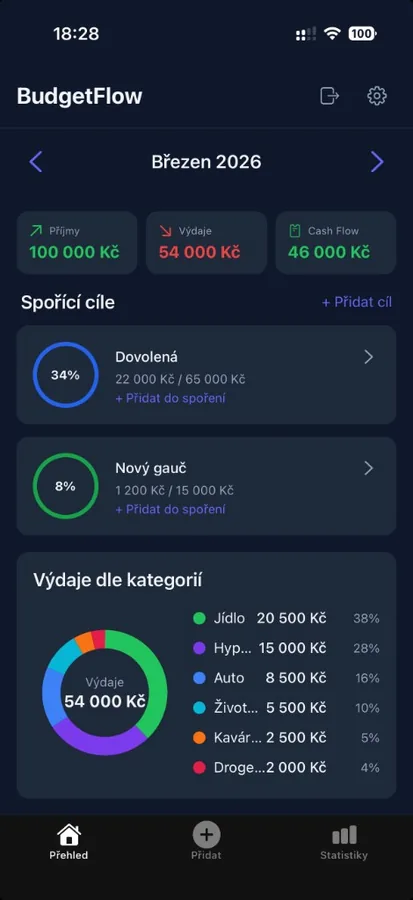
Income, expenses and cash flow for the month on one screen. Switch months with the arrows.
BudgetFlow: Monthly overview

Savings goals

Set a goal, for example a holiday or a new sofa, and track how much you have already saved.

BudgetFlow: Savings goals

Expenses by category

The chart shows where money goes: food, housing, car and other categories with amount and share.

BudgetFlow: Expenses by category

How to start

  1. 1

    Download

    Download BudgetFlow from the App Store.

  2. 2

    Income and expenses

    Enter your monthly income and expenses. No bank connection required.

  3. 3

    Goals and overview

    Add a savings goal and follow cash flow month by month.

Pricing

App Store

The app may be unlocked by a one-time fee through the Apple App Store. The exact price is shown in the App Store for your Apple ID region. Payment is processed by Apple.

Start today

Download the app and keep a clear overview without unnecessary complexity.

Download on the App Store
SupportPrivacy
BudgetFlow
Download on the App Store